If You Can't Sleep... Blog
17:16 Thursday, 14 October 2021
Words: 674
The wee hours of the morning are the most productive for me in terms of writing. There are no distractions. Often I wake up at 0300, can't fall back to sleep, give up and get up. Sometimes I'll read, and that will usually allow me to go back to bed and fall asleep; other times I come in here and write things that I often never post. Probably doing you a favor.
James at ODB speaks favorably of Apple Fitness. I've got the all-in-one subscription package from Apple, so I've got Fitness too. I've never used it, but his mention prompts me to take a look at it. In the decade since I stopped running, I've gained back all the weight I'd lost when I was training for marathons and half-marathons. In the past couple of months I've been committed to a routine of walking 2.5 miles in the morning, riding my bike for 6 miles, and then walking 2.5 miles in the afternoon or early evening. According to the movement tracker of my Apple Watch, this usually expends roughly 1,000 calories, and I'm down almost ten pounds. Don't need new pants yet, but it's visible on the horizon. But I do need to add some strength training/core work. I'm reluctant to use the extensive fitness facilities here because of COVID, so Apple Fitness may be something that'll motivate me.
I use a 2019 27" iMac, which usually has plenty of screen real estate, but I'm often shuffling windows around when I'm using a reference on the web and trying to get something done in another app. I've got one of the original 12.9" iPad Pros, so I tried using it as a second monitor in Side Car, and it works pretty well. The biggest issue is placement, I want to elevate it a bit. There are a number of stands available, but in a cursory search, nothing leapt out at me. I'll take another look eventually, it's more a nice-to-have at the moment.
In my effort to improve my Tinderbox proficiency, I created a TBX file to store notes about Tinderbox, things I've clipped from the web usually. I'll find a post at the Tinderbox Forum that speaks to an issue I have or am interested in, and I'll copy the relevant parts and paste them into a note. This often brings along some rtf or html cruft, chiefly in the form of some kind of background color behind the text. I was looking for a way to keep that from happening with as little effort as possible. Even "paste and match style" in Tinderbox allows that background color to come through.
One solution was to highlight the part I wanted, and use the Share extension for Notes. This places the text in Notes without the cruft. I could just set up a Watch container in Tinderbox and have it then import the Note into a Tinderbox note, but that's read-only so more manual intervention is necessary to do any further editing. I've found a pretty quick way using Text Soap. Since I'm using three apps, Safari, Text Soap and Tinderbox, it's not as convenient as just CMD-Tab back and forth, but it's not too onerous.
Well, it's almost 0600 so it'll be time to put my shoes on soon. I'm walking with my wife now, and she's all business. I used to carry a camera, and I'd stop and shoot anything that caught my eye. Consequently, my pace was never very fast. (It's walking! Who cares?) But when I walk with her, if I stop to take a shot, she's gone! That's the difference between having a job and being retired. I still have the phone, and I've been getting grab shots quickly. I suppose I could do the same with a camera, just configure it in auto, fire and hope to fix anything in post. But my Fitness app has all positive "trends" because my pace has increased so much over last year!
Hawkeye
Current Wx: Temp: 71.71°F Pressure: 1011hPa Humidity: 70% Wind: 10.36mphWords: 116
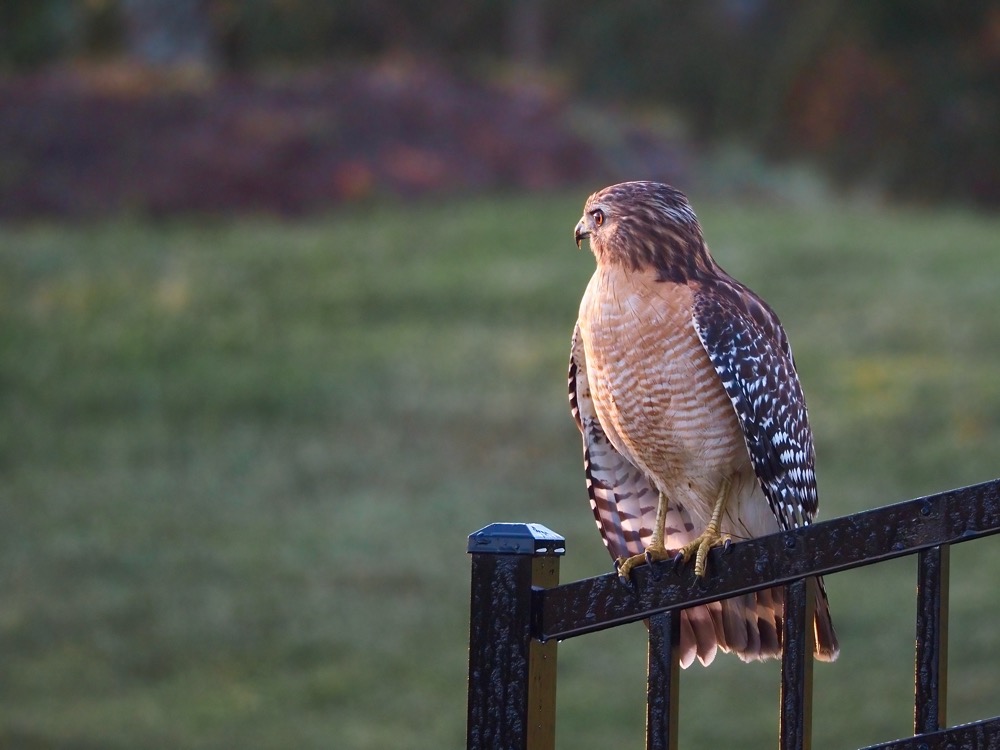
Yesterday I was startled by a hawk on my walk. It flew to a dead tree on the other side of the property fence. I tried to get a few shots, but it was pretty far away, even for the 75-300mm zoom.
So this morning I tried to remember to pay attention as I was approaching the back pond, and I was rewarded. I spotted this hawk on the fence, and it remained there and allowed me to approach pretty closely.
And creating this post, I discovered that the script seems to require that photos be in the thumbnail view, as opposed to viewing the image separately on the screen. No worries, good to know.
✍️ Reply by emailHi There!
Current Wx: Temp: 74.73°F Pressure: 1011hPa Humidity: 61% Wind: 13.8mphWords: 302
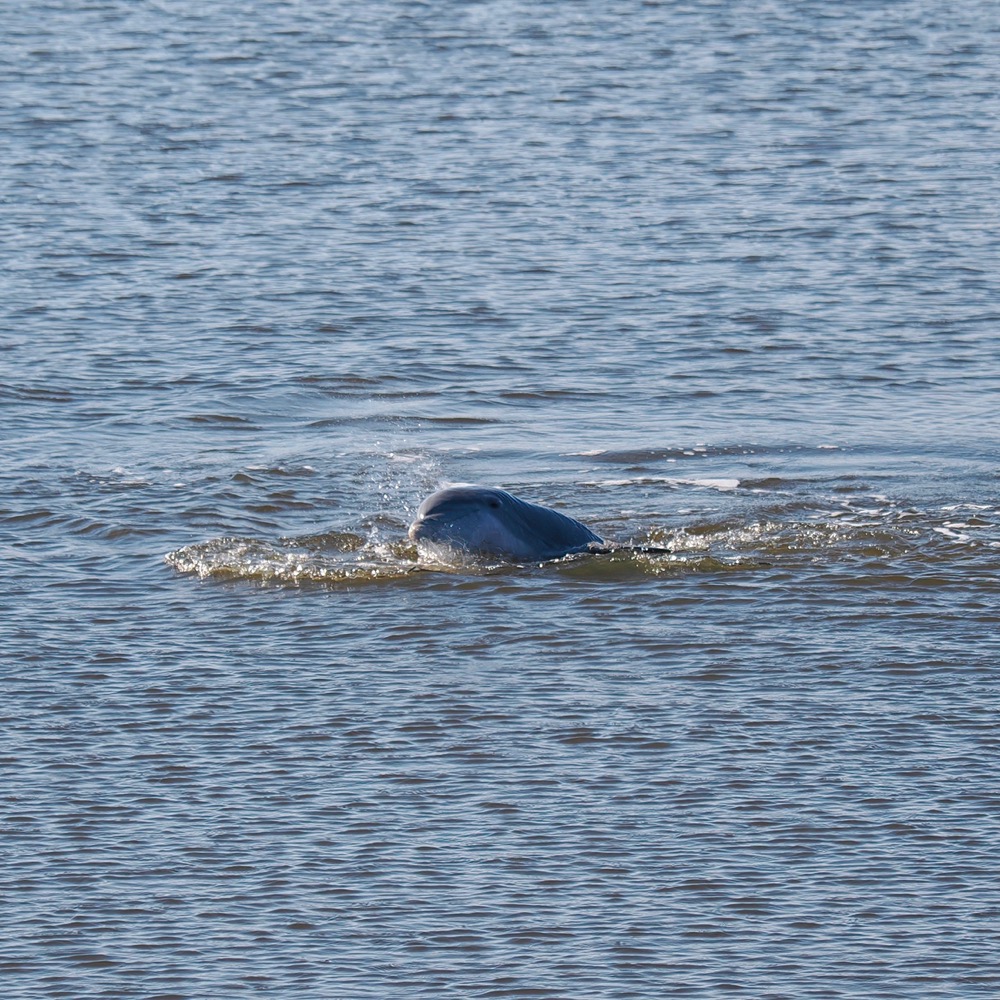
This is one of the dolphins we saw playing when we visited Cumberland Island. I'm posting it as another exercise in learning and refining this workflow.
I'm a sloppy coder, so I have versions of the script scattered here and there, which gets confusing. I'm making sure I know which one works. (There are two in the Scripts Library!)
I'd also been running the Automator workflow from within Automator. Now I've converted it to a Service, so Automator doesn't have to be running and I can do the initial steps all from Photos.
So the workflow is something like:
1. Edit photo for the marmot
2. Switch to thumbnail view
3. Run Photos to Tinderbox script from the Scripts menu
4. Select Export Photo for Weblog from the Services menu
5. Switch to Forklift and upload the photo to the server (need to work on this part)
6. Switch to Tinderbox and write whatever should appear in the post (like this).
7. I can Preview the post with the image, since it's now already on the server.
8. Export as HTML.
9. Sync the the folders with the server, which I can do from the Forklift item in the menu bar.
I need to look at Forklift and add another sync process for the images. I could do the whole thing all at once, but then the photo doesn't get to the server until the whole post is uploaded, so Preview in Tinderbox would show a broken image placeholder.
With another sync for images in the menu bar, I'm basically just working in Photos and Tinderbox with trips to the menubar and Services menu.
It may seem like a lot, but it's far, far less than I used to have to do, and I'm pretty please with how this is working out.
✍️ Reply by emailCongratulations, Jack
19:36 Saturday, 14 October 2023
Current Wx: Temp: 71.96°F Pressure: 1009hPa Humidity: 92% Wind: 6.91mph
Words: 10
Jack Baty has joined the ranks of grandparents. Great photo.
✍️ Reply by emailLast Night's Moon 10-13-24
Current Wx: Temp: 62.74°F Pressure: 1017hPa Humidity: 97% Wind: 0mphWords: 825
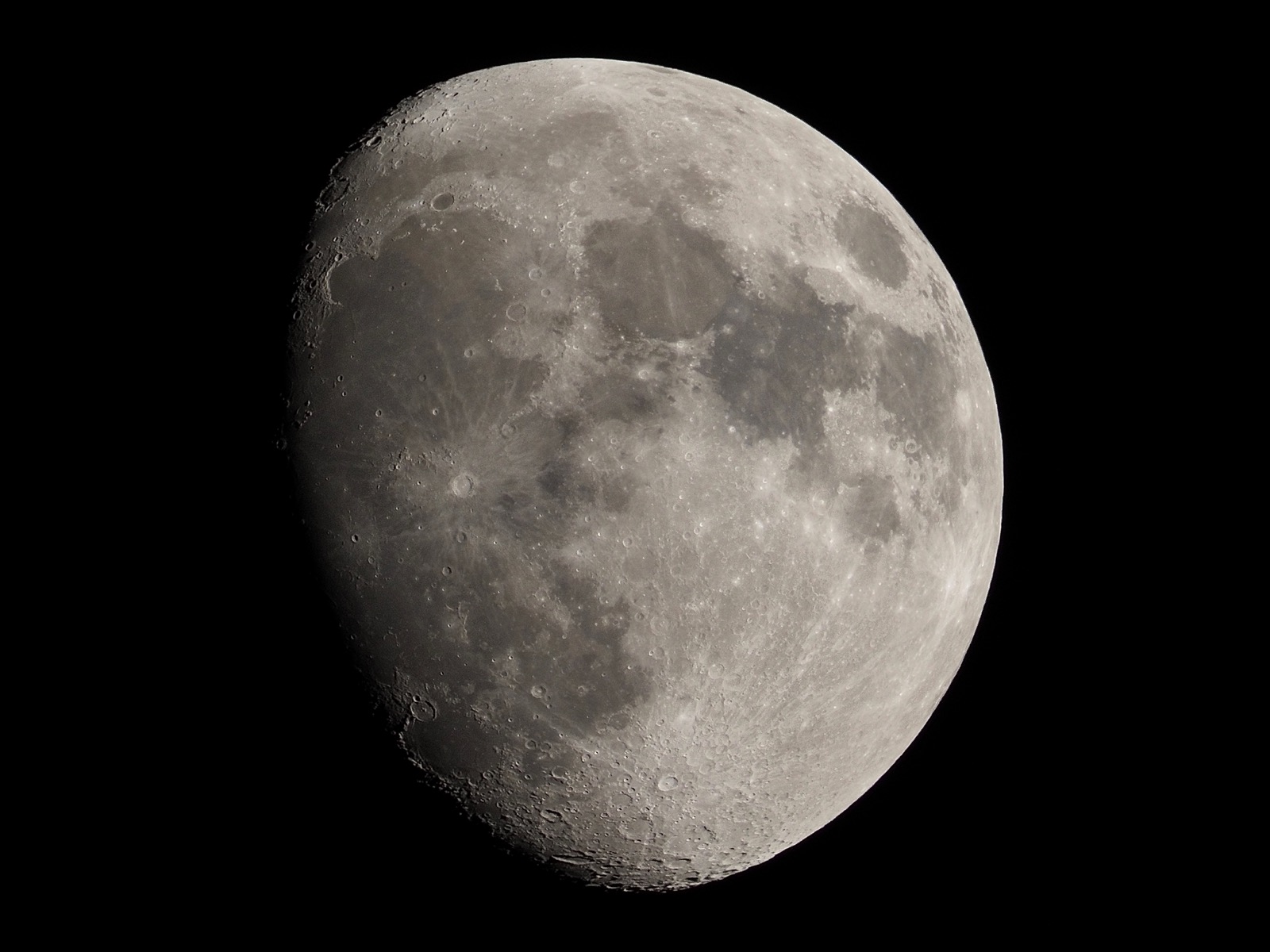
Hadn't done one of these in a while. Went out to look for the comet, but suspect my horizon is too cluttered, or sky is too bright. But it was clear and there was the moon.
Switched over from fidget spinner to doing some hi-res graphics stuff in Virtual ][, at least until I can figure out what's going on, then I'll play with it on the IIc. I need to look at an old issue of Creative Computing magazine, which is easier to do here at the iMac.
It's from the July 1984 issue, The Sierpinski Curve: A Lesson in Debugging and Conversion, by David H. Ahl. I'd link to it, but Archive.org is still offline after being hacked. If you google Sierpinski, you get a lot of stuff about the triangle, not so much about the curve. The article includes a nice capsule summary of the curve. Wikipedia does too.
In the article, Ahl is trying to convert a version of a program written in BASIC for the NEC 8801 computer, a Japanese computer, to some other variant of BASIC. Ahl wasn't very clear on which version of BASIC he was converting from and to, but both seemed ultimately to be some variant of Microsoft BASIC, which Applesoft is as well.
Apart from just being kind of interesting to watch as it is drawn onto the screen (which takes ~2m40s for the 5th order curve, at stock Apple II speed), it also deals with the concept of recursion. I have some notional understanding of the concept, but since I seldom do any real programming, as a practical technique, it remains kind of opaque to me. From the article:
This program, incidentally, takes advantage of the feature in MSX Basic and MBasic that permits a subroutine to call itself. This is known as recursion. It is often said that languages such as Basic and Fortran do not permit recursion. This is simply not true. While not all versions of Basic permit a subroutine to call itself, there are other ways of achieving recursion, but that is a subject for another day.
There are several subroutines in this program that call themselves.
The program that Ahl was converting would overlay curves of different orders, so you could have the 2nd order curve appear over the 1st order curve. It makes for a somewhat more interesting display. So far, my version works in drawing a single curve of orders 1 through 5, but it gets buggy when it begins to overlay two curves, so that's what I'm trying to figure out.
Ahl implemented a stack array to keep track of, well, something. I was confused because he didn't dimension (BASIC "DIM" statement) the stack array first. Looking at the Applesoft Reference Manual, apparently Microsoft let you get away with this and it assigns memory for 11 subscripts (elements 0 to 10) automatically. I'm not getting a BAD SUBSCRIPT ERROR, so I don't think that's the problem.
Anyway, it's something to distract me from the election. I cannot fathom how this thing can supposedly be this close. On the one hand, I'm somewhat encouraged by Harris's consistent, albeit slim, lead. I'm also encouraged by the evident lack of enthusiasm for Trump exhibited by my neighbors.
Four years ago, my street, and many if not most of the streets in this development, were positively festooned with American flags. This was code for Trump supporters, since the HOA doesn't permit partisan flags of any kind. Nothing like that today.
We were also having regular weekly "Trump flotillas" and boat parades. None of that has happened. Yet.
I don't see a lot of golf carts or pickup trucks driving around flying enormous Trump flags.
I'm rather certain that most of those folks will vote for Trump again; but they're not proud of it anymore. They don't want to own it.
Which is of absolutely no comfort.
"Plausible deniability."
It's almost more chilling.
And it's not just "rural Americans" who support this monster. These are wealthy suburbanites who embrace this fascist.
I'm eager to cast my mail-in ballot, so I can go online and verify that it has been counted. Then, if I have a stroke between now and election day, at least I'll have done what little I can to stop this catastrophe.
In the mean time, I'm going to distract myself by playing with old computers.
I need to order a 16-pin ribbon cable to plug into the Apple IIe in the garage. I want to bring those signals out to a breadboard to play with. This program is nothing but subroutines. Maybe add a line in four of the subroutines to ping one of the four annunciators available at that connector to light a different colored LED for each subroutine and see which one is lit most?
Well, mostly just because blinky lights are cool.
Something to look at...
Instead of staring into the abyss.
✍️ Reply by emailBlindness
08:12 Monday, 14 October 2024
Current Wx: Temp: 62.56°F Pressure: 1018hPa Humidity: 89% Wind: 0mph
Words: 261
I'm glad that this type of coverage is becoming, at least temporarily, more prevalent. All of this was foreseeable. But developers and the counties that benefit from the property taxes only saw the money, not the risk. We're over-developed, and it's probably uninsurable at this point.
Our premiums are still affordable, for us. We're nowhere near that $11K "average." If it ever does get that high, I think Mitzi would be more amenable to leaving. I don't know what's going to happen, but we're going to find out over the next 12 months, as insurance companies pull out of the market, go under, raise premiums and fight the state and policy-holders. This is a slow-moving catastrophe.
One thing the report doesn't mention is that many people can't afford to leave. They're tied to jobs, mortgages, and schools. They won't be able to sell their homes because they'll be uninsurable, so that keeps them stuck here.
This is a "cascading climate catastrophe," which I used to tweet about often when I was on Twitter. Where one domino tips over hundreds more.
What's going to happen to the housing market in Florida when mortgage companies won't lend because insurance is unavailable or unaffordable? What happens to home prices? What happens to that "wealth"?
It was all utterly predictable.
✍️ Reply by emailGovernor Dumbass
08:26 Monday, 14 October 2024
Current Wx: Temp: 63.03°F Pressure: 1018hPa Humidity: 89% Wind: 1.01mph
Words: 199
Ron DeSantis is an ambitious man. He's not unintelligent, but his ambition has made him a fool and he does a disservice not only to himself and his reputation, but to all the people of Florida he supposedly "serves."
Discounting the role of climate change in Florida's repetitive extreme weather disasters, DeSantis recently said:
“I just think people should put this in perspective,” DeSantis said at Thursday’s news conference. “They try to take different things that happen with tropical weather and act like it’s something — there’s nothing new under the sun.”
He's a fool. There is something new under the sun. THIS CLIMATE.
This climate, the one we inhabit today, has never existed before in the history of this planet. This amount of atmospheric CO2, with these polar caps, with this landscape has never existed before in this history of this planet.
Should I repeat that again?
Yes, there have been hurricanes before.
But there have never before been hurricanes that formed in these climatic conditions.
Because this climate has never existed before in the history of this planet.
I wish people could get this through their thick skulls.
Especially intelligent people who should be able to understand this.
✍️ Reply by emailFlorida is FLAT
09:35 Monday, 14 October 2024
Current Wx: Temp: 69.75°F Pressure: 1018hPa Humidity: 83% Wind: 5.75mph
Words: 117
Here's another unique feature of Florida that makes intense rainfall events more destructive: It's flat.
You don't get the kind of extreme, swift-water flash flooding that happens in mountainous regions where water rushes downhill. Instead, it slowly drains through the watershed. If the soils are saturated, it very slowly drains, eventually reaching the rivers and streams, which rise as they, themselves, move slowly, ultimately making their way to the sea.
Florida. A flooding paradise.
✍️ Reply by emailKinda Working
15:10 Monday, 14 October 2024
Current Wx: Temp: 86.9°F Pressure: 1014hPa Humidity: 54% Wind: 5.99mph
Words: 300
Made some progress today. I had left out a line, which didn't seem to matter for single curves. I could get multiple curves plotted, but the 2nd and 3rd and 4th order curves weren't aligning correctly with the first order. The fourth order curve was only about two thirds the size of the preceding three plots. It'll plot up to the 5th order, but it gets so busy, you have to plot it by itself. And that takes two and a half minutes.
Since the Apple II hi-res screen coordinates go from 0 to 191 in the y-axis, division by 4 was going to give me a decimal value that would be ignored. I made the quotient an integer value, but I forgot to round up.
H=INT((H0/4)+.5)
Once I did that, everything aligned properly.
I still have a "RETURN WITHOUT GOSUB ERROR," but I'm taking a break.
I turned on the virtual printer and added a TRACE command and got three pages of line numbers being executed. (16 #s per line of print, 66 lines per page!) I tried following the "push" and "pop" on the stack array, but it started to make me go cross-eyed. Anyway, it's working. I may do some debugging later.
Do I understand the recursion? Not really, but I'll play with it some more. There are some other curves I want to try.
✍️ Reply by emailWherein I Bitch About Stuff
08:17 Wednesday, 14 October 2026
Current Wx: Temp: 61.32°F Pressure: 1012hPa Humidity: 90% Wind: 4.23mph
Words: 848
Why is it so friggin' hot in October! 80° yesterday, forecast nearly that today. I just put away all my summer clothes! So, of course. Why am I even asking?
The CPAP adventure continues. I gave it another try last night and ripped it off my face about 90 minutes after I put it on. I think I may have actually fallen asleep at some point, but I'm not sure. I never have trouble falling asleep at bedtime. I lie down, think about something I like and I'm out. Minutes. With that face-hugger wrapped around my nose, all I can think about is how much I hate this thing, so of course I can't fall asleep.
The machine keeps nagging me to install the My Air app, another piece of corporate spyware to intrude into my life. Trying to give this thing a good-faith shot, I figured I'd install the app and see what tips it had.
NOPE!
First you must create an account!
Because of course.
So I start trying to create an account and I get to the part where they want my date of birth. How do you enter that data? But using a date picker. Can't just type it in. So how is the date picker configured? Well, it starts at a month in like 1997, and the only thing you can do is swipe one month at a time! I was born in 1957! You want me to sit there and swipe my thumb 480 times??!! I tried swiping fast thinking it'd develop some acceleration in the UI. Nope.
Exasperated, I closed the date picker thinking I must have missed something in the date field...
Nope. Can't do anything but disclose the date picker.
Which I did.
And it reopens to 1997 again!
I deleted the app.
How much contempt must you have for your users to deploy an app like that? Fuck Res Med.
Moving on...
Apple apologists, and you know who you are, please explain to me this Homeview device and it's price structure. Let's see, I can get the one with the woofer that I can set on a table somewhere for $299, or, I can get one that mounts on a wall without a woofer for the same $299! Oh, and you can't just mount it to the wall, you have to spend at least another $79 for the mounting hardware!
Make it make sense.
Fuck Apple.
Moving on...
Last night's insomnia was inspired by HVAC, again. Mitzi got home yesterday and a lot has changed in the house since she left, with the roof on, it really alters your perspective of the space, actually making it feel larger. That's a good thing.
We were looking at the little laundry area we have on the main floor. It was originally intended to hold a stacked washer and dryer and a deep sink. Then we realized we had to route the ducting from the ERV down to the mechanical room somehow.
No problem, plenty of room for a soffit overhead, and we can just route it to the stairwell wall and down through laundry floor.
Except that pretty much eliminates any option for a deep sink or even a cabinet with a top for folding laundry. That's if the stairwell wall lands where we can get the ducts between two trusses. And looking at the trusses at that wall, that's probably not feasible.
I came up with the idea of making a false wall at the back of the stairwell, so the ducting can go right through the laundry room through the original stairwell wall in an overhead soffit, and then down below the trusses, making another 90° turn into the mechanical room.
I can't believe how lucky we got with that extra course of ICF block giving us 9'-4" ceilings in the basement, because we're going to need some of that in the stairwell to get below the trusses without bumping our heads.
I'm still not sure it'll work, because I'm just visualizing it in my head, and I'm sure I'm missing something. (As I'm sitting here, I realize a false wall is going to intrude on the landing at the bottom of the basement, so it's got to end somehow below the trusses and it has to somewhat not look stupid in the process.)
In all my research about building high-performance homes, nobody mentioned how critical your HVAC design is, not just from a performance standpoint but from a ductwork design standpoint.
Fuckers.
Moving on...
On the brighter side, my OM System PEN camera is supposed to arrive today, according to FedEx who is informing me that I must be here to sign for it. Luckily, I have nothing else to do today but sit around and wait for FedEx again, like I did last week when I had to wait for a >$100K check from the credit union because criminals have made it nearly impossible to move money electronically. FedEx is faster than fiber in that instance.
Fucking criminals.
The beat goes on...
✍️ Reply by emailA Beautiful Day In The Neighborhood
14:34 Wednesday, 14 October 2026
Current Wx: Temp: 63.95°F Pressure: 1013hPa Humidity: 84% Wind: 9.42mphWords: 66
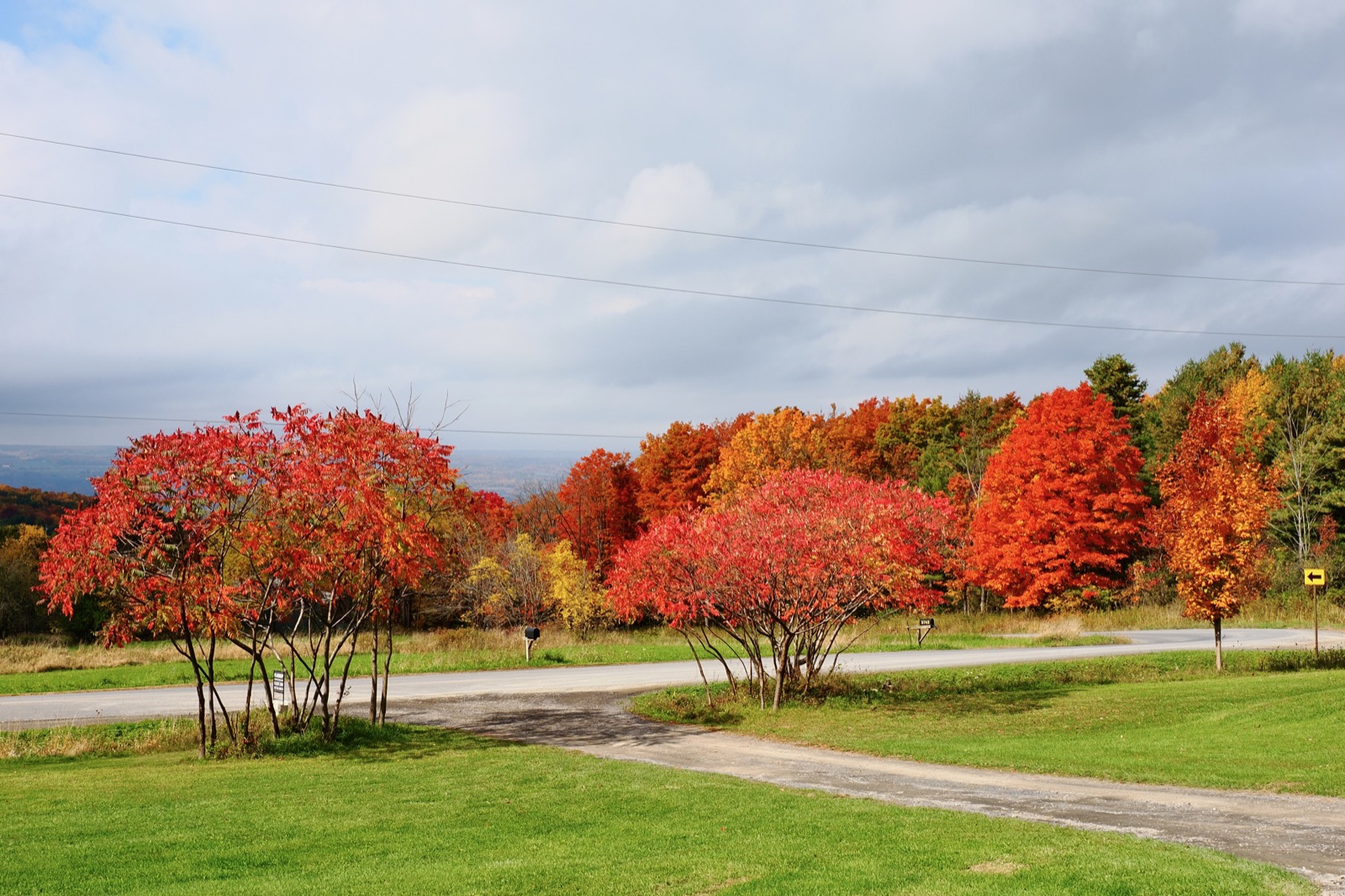
I wandered up the new house to see what they were up to. I looked out over the landscape from what will be our front window and decided I needed to go back down and come back with a camera.
Put a few up on Flickr. Thanks for the fave and the comment, Jack!
It can be pretty cloudy sometimes, but when the sun's shining...
Wow.
✍️ Reply by emailTear-Jerker
15:57 Wednesday, 14 October 2026
Current Wx: Temp: 62.19°F Pressure: 1014hPa Humidity: 81% Wind: 10.74mph
Words: 42
This is one of the scenes in the season finale of Ted Lasso that really got me in the feels. I watched the finale again yesterday with Mitzi and it had lost none of its affect on me.
✍️ Reply by email